Deep dives into software, hardware, and the ideas reshaping how we build things.

Author: Janet Ray Page 7 of 12

Why Good Documentation Is Not Optional

I have lost count of the times a colleague has messaged me with a question that was answered in our documentation. Not because the documentation was hard to find, but because they never thought to look. We have all been there, on both sides of that conversation. The problem is not that people refuse to read documentation. The problem is that most documentation is not worth reading.

Good documentation is not a nice-to-have. It is not a box to check before shipping. It is part of the product. If your team cannot understand, maintain, or extend your system without asking someone a question, your documentation has failed.

Team collaborating on documentation at a workspace

The Real Cost of Poor Documentation

Bad documentation does not just waste time. It actively damages your engineering culture. When documentation is incomplete or outdated, people stop trusting it. Once trust is gone, people stop reading. They go straight to the person who wrote the code. That person becomes a bottleneck, and the knowledge stays locked in their head.

Here is what that actually looks like on a project:

  • Onboarding drags on. New engineers take weeks longer to become productive because they have to learn through oral tradition instead of written reference.
  • Recurring mistakes. The same bugs reappear because the reasoning behind earlier decisions was never recorded.
  • Single points of failure. When one person holds all the context, that person leaving means the team starts from scratch.
  • Review bottlenecks. Code reviews take longer because reviewers lack the design context they need to evaluate changes.

A report from Accenture estimated that knowledge workers spend roughly 20% of their time searching for internal information or tracking down colleagues who can help. That is one full day a week lost to poor knowledge management. Imagine what your team could build with an extra day every week.

What Good Documentation Actually Looks Like

Good documentation is not about volume. A 200-page wiki that nobody reads is worse than a single well-written README. The best documentation I have worked with shares a few traits:

It Answers a Specific Question

Every section of your documentation should exist because someone had a question. “How do I set up the development environment?” “What does the payment service expect in the webhook payload?” “Why did we choose Kafka instead of RabbitMQ?” If you cannot articulate the question a section answers, that section probably does not belong.

It Is Written for the Reader, Not the Writer

The person writing the documentation already knows the system. The person reading it does not. This sounds obvious, but I regularly see documentation that assumes the reader already knows which services exist, what the deployment pipeline looks like, or how the data model is structured. Write for the engineer who joined yesterday. Write for the engineer who will join six months from now, after you have moved on to another project.

Developer writing documentation on a laptop

It Includes the “Why”

API reference docs tell you what a service does. Good documentation tells you why it does it that way. Decision records, architecture notes, and inline comments that explain reasoning are what separate useful documentation from generated reference material. When someone reads your documentation, they should come away understanding not just how the system works, but why it was built that way.

It Is Easy to Find

Documentation that lives in a separate tool that nobody checks is documentation that does not exist. Keep your docs close to the code. A README in the repository, inline comments, and well-structured markdown files next to the source they describe will always outperform a separate Confluence space that everyone has bookmarked but nobody visits.

Documentation as a Team Practice

Individual writers can start good documentation habits, but teams sustain them. Documentation is not a one-time task you finish before a release. It is a living artifact that needs the same care you give your code.

A few practices that work well:

  • Treat docs like code. Put documentation in version control. Review it in pull requests. Accept that it will need updates and make those updates part of your normal workflow.
  • Make it someone’s job. Rotating a documentation owner each sprint ensures the work does not fall through the cracks. This person reviews existing docs for accuracy, identifies gaps, and writes new material as the system evolves.
  • Test your docs. Follow your own setup instructions on a clean machine. If you cannot reproduce the steps, neither can anyone else. This is the same principle as testing your deployment scripts: if you have not run it fresh, you do not know it works.
  • Write during the work, not after. Documenting while you build keeps the details fresh and prevents you from forgetting what you decided and why. Waiting until the end means you will reconstruct from memory, and you will miss things.

Engineering team reviewing documentation together

Common Objections (And Why They Miss the Point)

I hear the same pushback whenever I advocate for documentation. Let me address the most common ones directly.

“The Code Is the Documentation”

Code tells you what the system does. It does not tell you what it was supposed to do, what alternatives were considered, or what constraints shaped the implementation. Reading source code to understand system behavior is like reading assembly to understand a Python program. Technically possible, practically a waste of time.

“Things Change Too Fast to Document”

This is exactly why documentation needs to live next to the code and be updated as part of the development cycle. Stale documentation is a maintenance problem, not a reason to skip documentation altogether. If your docs are always out of date, the problem is your process, not the concept.

“We Do Not Have Time”

You do not have time not to document. The upfront investment pays for itself quickly in faster onboarding, fewer interruptions, and less rework. A team that spends two hours writing good documentation saves ten hours of questions and confusion later. The math is straightforward.

Making Documentation Sustainable

The hardest part of documentation is not writing it. It is keeping it alive. Here is a straightforward framework that has worked for teams I have been part of:

  1. Start small. Write a README that covers setup, basic usage, and where to find more information. You do not need to document everything at once.
  2. Build the habit. Add “update relevant docs” to your PR checklist. Make it a non-negotiable part of the process, just like running tests.
  3. Accept imperfection. Good enough documentation that exists is better than perfect documentation that never gets written. You can always improve it later.
  4. Prune regularly. Delete outdated docs. Mark pages as deprecated. Stale documentation erodes trust, and trust is hard to rebuild.
  5. Get feedback. Ask new team members what was clear and what was missing. They are your best test case because they have not yet internalized the system’s quirks.

The Google Tech Writing resources offer solid guidance on structure and style if you want a starting point for writing clearer technical documents.

FAQ

How much documentation is enough?

Enough that a new team member can set up their development environment, understand the system architecture, and make a small change without asking for help. If they still need to find “the right person” to answer basic questions, you need more documentation. If they are drowning in pages of detail that never answer their actual questions, you need better documentation.

Where should documentation live?

As close to the code as possible. Repository READMEs, markdown files alongside the modules they describe, and inline comments are the best starting points. Use a wiki or separate documentation site for higher-level architecture overviews and onboarding guides, but always link back to the source. The easier your documentation is to find and update, the more likely it is to stay current.

How do you keep documentation up to date?

Treat it as part of the definition of done. A feature is not complete until the documentation is updated. Include documentation reviews in your PR process. Rotate ownership so the responsibility does not sit on one person. And schedule regular reviews where someone reads through the existing docs and flags anything that looks outdated. These practices take discipline, not genius.

Final Thought

Documentation is not separate from engineering. It is engineering. The same clarity of thought that goes into writing clean code goes into writing clear documentation. If you cannot explain how your system works, you probably do not understand it as well as you think you do.

Start with one README. Make it clear, make it accurate, and keep it updated. The rest follows from there.


Why Good Documentation Is Not Optional

Every engineer has been there. You inherit a service someone else built. The README is three lines long, one of which says “TODO: add setup instructions.” You spend a week figuring out what should have taken a day. That lost week is not a learning opportunity — it is a tax on bad documentation.

Documentation is not a nice-to-have. It is infrastructure, just like your CI pipeline or your monitoring dashboard. And when that infrastructure is missing or broken, the cost shows up in ways that are easy to ignore until they compound into real damage.

Team collaborating over code on a laptop

The Real Cost of Missing Documentation

Bad documentation has a price tag. You just do not see it on a bill. It shows up as time spent reverse-engineering decisions instead of building features. It shows up as outages caused by someone who did not understand a system well enough to change it safely. It shows up as new team members taking three months to become productive instead of three weeks.

A 2020 Stack Overflow Developer Survey noted that one of the biggest challenges developers face is working with undocumented or poorly documented code. This is not a new problem, and it is not getting better on its own.

Consider the math. If a team of eight engineers each spends two hours a week trying to understand undocumented systems, that is sixteen hours a week. Over a year, you have burned through more than eight hundred hours — the equivalent of a half-time employee — on friction that good documentation would eliminate.

Who Documentation Serves

Documentation is often framed as a gift to the next person. That framing is wrong. Documentation serves multiple audiences, and you are almost always one of them.

Your future self

Six months from now, you will not remember why you chose one caching strategy over another. You will remember that you had a reason, but the specifics will be gone. Writing that down when the context is fresh costs you minutes. Reconstructing it later costs hours or days.

Your team

When only one person understands how a service works, that person becomes a bottleneck. Every question goes through them. Every change needs their review. That is not job security — it is a single point of failure. If that person leaves, gets sick, or moves to a different project, the team stalls.

Your customers

For teams building APIs, SDKs, or platforms, documentation is part of the product. A well-documented API gets adopted faster. A poorly documented one generates support tickets, frustrates developers, and drives them to competitors. Stripe did not win developer mindshare just because their API was good — they won because their documentation made it trivially easy to start building.

Developer working across multiple screens with documentation

What Good Documentation Actually Looks Like

Good documentation is not long documentation. A fifty-page wiki that nobody reads is worse than no documentation at all, because it creates a false sense of confidence. Good documentation is usable. That means it is findable, accurate, and written for the person reading it.

Findable

If people cannot find your documentation, it does not exist. This means putting documentation where people look — inside the repository, linked from the service dashboard, searchable in the company wiki. If you have to ask someone where the docs are, the docs have already failed.

Accurate

Outdated documentation is worse than missing documentation. It steers people in the wrong direction with confidence. This is why documentation needs to live close to the code it describes. When docs are in the repo, they get updated in the same pull request as the code change. When they live in a separate wiki that nobody maintains, they rot.

Written for the reader

A design document written for the author’s team is useful to that team. It is not useful to an engineer on a different team who needs to integrate with the service. Good documentation meets its audience where they are. That might mean writing different documents for different audiences: a quick-start guide for someone evaluating the tool, a reference for someone using it daily, and an architecture overview for someone debugging it at 2 AM.

Common Anti-Patterns

After years of auditing documentation at various companies, a few patterns repeat themselves.

The “Code Is Self-Documenting” excuse

Code tells you what it does. It does not tell you why it does it, what alternatives were considered, or what constraints shaped the implementation. Reading code to understand a system is like reading a novel one word at a time with no paragraph breaks. It is possible, but it is not efficient, and it is not respectful of anyone’s time.

The giant wiki graveyard

Someone sets up a wiki. Everyone agrees documentation is important. A few pages get written with enthusiasm. Then the product changes, the wiki does not, and six months later the pages are actively misleading. This happens at almost every company. The solution is not more wiki pages. The solution is a documentation strategy that includes maintenance, not just creation.

The knowledge hoarding

Some engineers resist documenting because it reduces their perceived importance. This is understandable but corrosive. If your value to the team depends on being the only person who understands a system, you are not a senior engineer — you are a liability. Real seniority is building systems that others can run without you.

Close-up of code on a screen with comments visible

Building a Documentation Culture

Telling engineers to “write better docs” does not work. You need systems that make documentation the default, not the exception.

Make it part of the definition of done

If a pull request adds a new feature, it should also update the relevant documentation. If it does not, it is not complete. This is easy to enforce in code review and impossible to argue against if it is written into your team’s standards.

Write documentation templates

Starting from a blank page is hard. Starting from a template that asks “What does this service do? How do I run it locally? What are its dependencies?” is much easier. Templates reduce the effort and create consistency, which makes documentation more trustworthy because readers know what to expect.

Treat docs like code

This means version control, peer review, and CI checks. Store documentation in the repository. Review it in pull requests. Run link checkers and linters on it. If you treat documentation as a second-class citizen, it will become one.

Give people time

Documentation takes time. If your sprint planning only accounts for feature work, documentation will always get pushed aside. Allocate time for it. Make it visible in your project tracking. Celebrate good documentation the same way you celebrate good code.

Practical Starting Points

If your documentation is in bad shape today, do not try to fix everything at once. Start with the highest-impact areas.

Service READMEs. Every service should have a README that answers three questions: What is this? How do I run it? Who is responsible for it? If you do only one thing, do this.

Onboarding guides. A good onboarding guide for a new engineer should get them from zero to their first commit in under a day. If it takes longer, the documentation — or the system — needs work.

Runbooks. When something breaks at 3 AM, nobody wants to read a design document. They want a runbook that says “If you see this error, do this thing.” Runbooks turn a stressful incident into a manageable one.

Decision records. Architectural Decision Records, or ADRs, capture why a choice was made. They are short, timestamped, and stored in the repo. When someone asks “Why did we use RabbitMQ instead of Kafka?” you can point them to the ADR instead of relying on institutional memory.

FAQ

How much documentation is enough?

Enough that someone can use, operate, and debug your system without needing to talk to you. If you get the same question twice, the answer should be documented somewhere findable. You do not need to document every function in your codebase, but you do need to document every system that someone depends on.

Should documentation live in the repo or in a wiki?

Prefer the repo. Documentation that lives next to code gets updated when the code does. Documentation that lives in a separate system drifts from reality. There are exceptions — product-focused docs aimed at external users may need a different home — but for engineering documentation, the repo should be the default.

What if I do not have time to write documentation?

You do not have time not to write it. The time you spend answering the same question, debugging the same misunderstanding, or onboarding the same type of task without a guide adds up fast. An hour of writing saves ten hours of explaining. If your manager will not allocate time for documentation, that is a conversation worth having — and it helps to come with data about how much time undocumented systems are already costing the team.


Good documentation is not about being a good writer, though that helps. It is about respecting the people who come after you — including your future self. It is about making your systems survivable, scalable, and maintainable. If your code cannot be understood without you, it cannot be maintained without you. And that is a problem, not a virtue.

OpenTelemetry Just Crossed the Finish Line—And Your APM Vendor Knows It

The Moment Nobody Expected to Arrive This Fast

In November 2024, OpenTelemetry hit stable status for logs. That sentence might not land hard unless you’ve spent the last five years watching observability tooling splinter into incompatible fragments. What just happened is the completion of the trifecta: traces, metrics, and logs now live under a single open standard. The CNCF called it the most significant observability milestone since Prometheus. They’re not wrong.

I’ve been shipping metrics to half a dozen different backends over the course of my career. Each one felt like the right choice at the time. Each one locked you in just tight enough that switching felt like a rewrite. OpenTelemetry changes that calculus entirely. You instrument once. You send anywhere. This isn’t marketing copy. This is infrastructure finally maturing.

Production Is Already Here—Just Unevenly Distributed

Here’s what convinced me this wasn’t another aspirational open-source project: the Docker Hub numbers. The OpenTelemetry Collector has crossed 1 billion pulls. That’s top-10 territory on Docker Hub. Real infrastructure, real production workloads, real teams betting their observability on this thing.

A billion pulls doesn’t happen by accident. It doesn’t happen because marketing is good. It happens when engineers across thousands of companies collectively decide that this tool solves a real problem better than the alternatives. Those are your peers making this decision. Not once. Not as experiments. In production.

Grafana Labs surveyed 400 engineering organizations this year for their Grafana Labs Observability Survey 2025. Sixty-seven percent had adopted or were actively piloting OpenTelemetry instrumentation. Two years ago that number was forty-four percent. That’s adoption velocity you can’t ignore.

The Vendor Pressure Is Already Real

Datadog’s CFO went on a Q4 2024 earnings call and said something CFOs almost never say out loud: they acknowledged pricing pressure from open-source observability tooling. Specifically, they cited it as a factor in slower net revenue retention among SMB customers. That’s not speculation. That’s a public company admitting the game has changed.

This matters because CFOs don’t say things like this unless it’s undeniable. They have armies of lawyers and investor relations people ensuring every word is defensible. When Datadog says open-source tooling is pressure, what they mean is: we’re losing deals we used to win. SMBs are building on OpenTelemetry and deploying to open-source backends instead of calling us.

The pricing model that worked for a decade is breaking. If you’re paying per gigabyte ingested, and you can instrument with open standards and send to a cheap backend instead, the math becomes obvious. Vendors who built their model on capture and lock-in are discovering that lock-in requires friction. OpenTelemetry removes friction.

Multi-Cloud Becomes Real Without Vendor Code

Last year, AWS, Google Cloud, and Azure all announced native OTLP ingestion support. OTLP is the OpenTelemetry Line Protocol. What this means practically: you can instrument your code once and send it to any of these three platforms without writing a single line of cloud-specific code. Zero vendor SDKs. Zero lock-in mechanisms baked into your instrumentation layer.

This is the infrastructure equivalent of a standard shipping container. Before containers, shipping was vendor-specific. Shipping companies had their own boxes. Standards killed that. OTLP is doing the same thing to observability.

Try that five years ago. You’d instrument with Datadog’s SDK. You’d instrument with New Relic’s SDK. If you wanted to switch, you’d find instrumentation code scattered across your codebase. Now you instrument once with OpenTelemetry project official site libraries. You deploy to AWS today, Google Cloud next quarter, and your instrumentation doesn’t budge. It doesn’t know the difference.

What This Means for You Next

If you’re building new services, this is your path. If you’re maintaining instrumentation in an existing system, you don’t have to rip and replace today. But you should be thinking about it. Not because OpenTelemetry is perfect, because it’s not, but because it’s stable, widely adopted, and most importantly, it removes your observability stack as a reason to stay with a vendor.

The competitive game for observability is shifting from “who has the best visualization” to “who has the cheapest egress for OTLP data.” That’s a different game. Cheaper wins. Open wins. Boring infrastructure wins.

If you’ve been sitting with this on your backlog, now is the moment. Not next quarter. Now. The window where switching costs money is closing fast. The window where it costs nothing is opening. Have you already moved any services to OpenTelemetry? I’d like to hear what worked and what didn’t.

The Inference Tax: Why Your AI Budget Is Getting Eaten Alive (And What You Can Actually Do About It)

The Math Nobody Wants to Look At

Six months ago I sat in a room with three different teams who’d all made the same discovery independently. They’d built impressive AI products. They’d shipped to production. And then the AWS bill showed up.

The pattern was identical across all three: inference costs weren’t the tail risk they’d assumed during planning. They were the whole dog. When Andreessen Horowitz published their 2025 State of AI report, they quantified what I’d been hearing anecdotally for months. At scaled startups, inference spending now consumes between 60% and 80% of total AI infrastructure budgets. Training? That’s a rounding error by comparison. This wasn’t a surprise to anyone who’s actually run these systems at scale, but seeing it in writing changes how leadership thinks about the problem.

The issue is structural. Training happens once. You pay that cost, you move on. Inference happens every single time a user interacts with your product. If you’re processing thousands or millions of requests daily, those token costs compound into something genuinely alarming. Most teams don’t feel the pain until they’re already committed to a specific architecture.

The Tiered Routing Architecture Is No Longer Optional

The smarter teams have stopped asking whether they should implement model routing. They’re asking how quickly they can get it running.

Here’s the reality that took time to sink in for most of us: not every request needs GPT-4. Actually, most requests don’t. A subset of your queries demand the full power of the largest models. The rest can get routed to something smaller and cheaper without degrading user experience. OpenAI’s gpt-4o-mini, released in July 2024, costs $0.15 per million input tokens. Compare that to gpt-4o at $5.00. That’s over a 30x price difference. You can’t ignore that math.

The Databricks State of Data and AI 2025 report found that 43% of enterprise AI teams have already implemented model routing or cascading strategies. This isn’t theoretical anymore. It’s table stakes in certain organizations. The idea is straightforward: classify incoming requests by complexity, route simple ones to cheaper models, reserve expensive models for queries that actually need them, measure quality carefully, iterate.

The infrastructure to do this has gotten substantially better. AWS introduced Bedrock Intelligent Prompt Routing in late 2024. The feature examines incoming prompts and automatically routes them to the most cost-effective model that can still meet your quality thresholds. AWS is targeting up to 30% cost reduction for teams that implement it. That’s not trivial when you’re running millions of inferences per day. For more details, check the AWS Bedrock Intelligent Prompt Routing overview.

Latency Isn’t Free Either, But There Are Tricks

Cost optimization creates a new problem: speed. Route everything to smaller models and you save money. But if responses get slower, users notice. That tension is real and worth acknowledging directly.

This is where speculative decoding enters the conversation. Google Cloud added support for this technique in Vertex AI Model Garden in late 2024. The approach uses a smaller, faster draft model to pre-fill token sequences, then a larger model validates and refines the output. The result is significant: inference latency can drop by 2x to 3x on large models. You’re maintaining quality while cutting response time. It’s not magic, but it’s close.

The tradeoff is complexity. You need to orchestrate two models instead of one, with monitoring and fallback logic on top of that. But if you’re already running at scale and price matters, the engineering investment is worth it. Teams that have implemented it report that users don’t perceive any quality degradation, just faster responses.

The Organizational Shift Required

Here’s what surprised me most while talking to teams about this: the technical solution is actually easier than the organizational one.

Most teams started their AI projects with a simple question: can we build this? They answered yes. They shipped it. Then the infrastructure team got involved and asked a different question: can we afford this? The answer was often no. But by then, product requirements had been locked in, customer expectations set, and the architecture hardened into place.

The teams executing well now handle this differently. They ask the cost question during architecture design, not after. They build observability into model routing decisions from day one. They measure not just latency and quality, but cost per transaction. They treat inference spend as a first-class constraint, like memory usage or database queries. It’s a mindset shift more than a technical one.

The vendors have noticed this too. AWS, Azure, and Google are all shipping tools specifically designed to make routing easier. This wasn’t on the roadmap two years ago. But when 70% of your infrastructure spend is going somewhere, you build tools to help people control it.

What Actually Matters Now

If you’re building or operating AI products at any meaningful scale, start measuring your inference costs today. Break them down by model, by request type, by user segment if possible. Find where the money is actually going. Most teams discover that a small percentage of their requests consume a large percentage of their budget. That concentration is where the leverage is.

Then get stubborn about cost per transaction. Track it like your business depends on it, because it does. Implement tiered routing. Experiment with cheaper models for specific use cases. Monitor quality carefully. The goal isn’t to cut corners. It’s to match model capacity to actual requirements.

The teams winning this game right now aren’t the ones who picked the most impressive model. They’re the ones who got disciplined about the economics early. They’ll outrun everyone else because they’ll still be profitable when others are still trying to figure out where all the money went.

What’s your inference budget looking like? Have you started measuring costs by model yet, or is that still on the backlog? I’m genuinely curious what’s working and what’s not in your stack.

Claude 3.7 Sonnet’s Extended Thinking: The Production Reality Behind the Benchmark Wins

The Reasoning Tax Is Real

Anthropic released Claude 3.7 Sonnet in February 2025, and the extended thinking mode landed like a controlled demolition in the AI engineering world. Not because it’s revolutionary. Because it forces you to make actual tradeoffs instead of pretending they don’t exist.

Here’s what extended thinking does: it lets the model work through multi-step problems internally before committing to a response. You configure a token budget, up to 128K tokens, and the model uses that space to reason, backtrack, reconsider. Then it delivers an answer. Sounds clean. The reality is messier.

The latency hit runs 15 to 40 seconds per complex query, depending on how many tokens you allocate for thinking. That’s not a minor detail. That’s the difference between a system users can tolerate and one they abandon. I’ve watched teams discover this after deploying to production. It’s not a fun conversation.

The Benchmark Signal Worth Taking Seriously

On SWE-bench Verified leaderboard, Claude 3.7 Sonnet hit 70.3% on autonomous coding tasks at release. It beat GPT-4o. It beat Gemini 2.0 Pro. When I say that matters, I mean it matters specifically because this benchmark tests something real: the model’s ability to navigate codebases, propose fixes, and execute without human intervention at each step.

But here’s the thing nobody’s emphasizing enough. Those benchmarks were run with extended thinking enabled. That’s the only way the model scored that high. The standard mode performance hasn’t been published in comparable detail, and that silence is its own message.

In my experience, benchmark wins are signal worth tracking. They tell you where the frontier is moving. This one tells you that structured reasoning moves the needle. It also tells you that the tradeoff math changes depending on your use case.

The Cost Equation Nobody Wants to Solve

Developers reported 2 to 3x cost increases per task when extended thinking is active. That’s not speculation. That’s coming from people running real workloads on the Anthropic developer forum. Two to three times.

Think about what that means for a pipeline processing thousands of requests daily. A task that costs $0.10 in standard mode now costs $0.20 to $0.30. Scale that across your monthly volume and you’re making a different business decision.

The honest take: this is a feature tax, and it’s worth paying for the right problems. Autonomous code generation at scale? Pay it. Complex multi-step reasoning on safety-critical decisions? Absolutely pay it. Routing customer support tickets? No. You need a different approach.

The dangerous move is assuming the cost will come down fast. Moore’s Law doesn’t apply directly to LLM inference the same way it did to silicon. Better hardware helps. Better quantization helps. But reasoning is fundamentally more expensive than recall. That’s thermodynamic reality, not a product roadmap problem.

Why AWS Bedrock Adoption Matters More Than You Think

AWS Bedrock integrated Claude 3.7 Sonnet within weeks. That’s the fastest Anthropic has moved a model to general availability on a major cloud provider. This isn’t about AWS wins or Anthropic’s distribution strategy. It’s about what it signals about confidence.

When a model reaches Bedrock that fast, it means the enterprise teams at Amazon have already vetted it. They’ve tested it. They believe it’s stable enough for customers who can’t tolerate surprises. That’s different from a model being available on the Anthropic console.

For production teams, this matters a lot. Bedrock means enterprise support contracts. It means capacity guarantees. It means you can bet your SLA on it. That didn’t exist for Claude models a year ago.

What Actually Changes for Your Pipeline

Extended thinking mode is not a feature you flip on universally. It’s a tool you deploy surgically. The Anthropic Claude 3.7 Sonnet release announcement walks through the mechanics, but the strategic question is harder: where in your stack does structured reasoning justify the latency and cost?

Complex analysis steps? Yes. Code generation with correctness requirements? Yes. Extracting entities from unstructured data? Probably not. Answering a factual question? Definitely not.

The models that matter most going forward will be the ones that let you make this decision per-request, not per-deployment. Give me a token budget dial I can tune for different queries. Let me experiment. Let me understand my cost curves.

This is still early. The benchmarks show real capability gains. The production deployments are still figuring out what works. The cost-to-benefit calculation is different for every organization. If you’re building AI pipelines right now, spend time understanding your latency constraints and cost boundaries before assuming extended thinking is the answer. It might be. It might not be. The senior engineers I know are asking the right questions first, moving fast second. That’s the rhythm that leads to systems that actually work.

Aurora DSQL: The Distributed SQL Database That Actually Fixes What Broke Before

The Announcement Nobody Was Waiting For (But Should Have Been)

Last December at re:Invent, AWS dropped something that didn’t get the fanfare of a new EC2 instance type or a Bedrock model update. It was quiet. Almost too quiet. They announced Amazon Aurora DSQL, and if you weren’t paying attention during that keynote, I wouldn’t blame you. But you should go back and listen. This matters more than the noise suggested.

Here’s the thing about distributed SQL databases: they’ve been the white whale of cloud infrastructure for a decade. Every major cloud provider has chased it. Google nailed some fundamentals with Spanner. CockroachDB built something genuinely useful from the ground up. But Amazon was the last major player to ship something production-ready in this space. Now they have, and they did something interesting with it.

Aurora DSQL isn’t a me-too product. It’s built on a different set of assumptions than what came before. That’s worth understanding, regardless of whether you end up using it.

What Makes This Different: Architecture Decisions That Actually Paid Off

Most distributed SQL databases you’ve heard of rely on Multi-Version Concurrency Control. It’s a solid pattern. MVCC lets you keep multiple versions of data around so readers don’t block writers. Proven. Battle-tested. But MVCC has a cost when you’re crossing regions. The farther your data spreads, the more work you do managing versions. Amazon made a different bet.

Aurora DSQL uses optimistic concurrency control with an external transaction log. The transaction log lives separately from your storage. This is a real departure. The claim from AWS is specific: up to 40 percent reduction in write latency for cross-region workloads. That’s not marketing math. That’s meaningful. The architecture tells you something important about what they optimized for. They optimized for writes that span geography.

The external log changes everything about failure modes and recovery. Your storage nodes can fail independently. Your transaction layer can scale differently than your data layer. You get flexibility in how you compose the system. It’s not revolutionary, but it’s thoughtfully done.

The headline promise is straightforward: 99.999% multi-region availability without managing read replicas. No read-only secondaries you have to babysit. No replica lag to worry about. Everything you write is immediately available everywhere. That’s a promise that only makes sense if your architecture can actually deliver it. Aurora DSQL’s design suggests they can.

Pricing and Production Timeline: The Reality Check

Pricing starts at $0.50 per DPU-hour. You’re paying for compute provisioned for your query processing. This puts Aurora DSQL directly against what CockroachDB Dedicated charges and what you’d pay for Google Cloud Spanner. It’s not cheap. But it’s priced like something built to handle serious workloads in regulated industries. The pricing sends a signal about the target customer.

Aurora DSQL reached general availability in the first quarter of 2026. Four regions to start. That’s conservative, and I think intentional. AWS is doing something they don’t always do: shipping something complete rather than shipping fast. More regions will come throughout the year. But if you’re in one of the initial regions and your problem actually fits the use case, you can use this today.

The GA date matters because it means you’re not buying into a beta narrative. This isn’t an experimental database. AWS has customers in production on this already. They’re charging GA prices. They’re standing behind the availability guarantees. That’s a different statement than preview or limited availability.

Why This Matters in Context: The Distributed SQL Moment

Gartner’s 2025 Magic Quadrant for Cloud Database Management Systems identified distributed SQL as the fastest-growing segment. The year-over-year adoption rate among Fortune 500 companies hit 38 percent. That’s acceleration. Something shifted. Compliance got stricter. Data residency requirements became real. Regulatory regimes started mattering more. Suddenly, having your database sprawl across regions while maintaining consistency stopped being a nice-to-have. It became a requirement.

Google Cloud Spanner has been the reference implementation. They process over two billion requests per second across their customer base. They’ve proven the model works at scale, though largely within a specific ecosystem. If you’re deep in Google Cloud, Spanner is the natural choice. But Spanner lives in Google Cloud. If you’re AWS-native, Spanner means operating two database platforms. That friction just got removed.

CockroachDB is still a solid choice for PostgreSQL compatibility and multi-cloud flexibility. But CockroachDB requires you to run your own infrastructure or use their hosted offering, which means a separate operational domain. Aurora DSQL lives inside the AWS console. It integrates with your IAM. It works with your VPCs. That integration tax matters more than people admit.

When You Actually Want This Database

Aurora DSQL makes sense for specific problems. If you have workloads that absolutely require strong consistency across regions, this is built for you. If you’re managing financial transactions, healthcare records, or anything regulated that spans geographies, you need this. If you’ve been running aurora-mysql with a failover to another region and you’re tired of managing the complexity, this removes layers of work.

It doesn’t make sense if you need multi-cloud. It doesn’t make sense if you’re PostgreSQL-only and need that specific ecosystem. It doesn’t make sense if your consistency requirements are relaxed or your data is already partitioned. Databases are tools. Good engineers pick tools for problems.

What strikes me about Aurora DSQL is that it shows AWS actually thinking about difficult problems rather than just building faster versions of existing things. They looked at what Google had done with Spanner. They looked at what the market was asking for. They looked at what their own customers needed. Then they built something different. That’s the move worth paying attention to.

Have you run into situations where distributed SQL would have solved something? Or do you think the operational overhead is overblown? I’m curious what you’ve actually faced. Reach out and share what you’re building.

Salt Typhoon Hasn’t Left: What API Developers Need to Know in 2026

The Breach Is Older Than Most of Your Deployment Pipelines

Let’s start with the timeline. In December 2024, U.S. government agencies confirmed what had been quietly suspected: Salt Typhoon, a Chinese state-sponsored threat group, had compromised at least nine major telecommunications providers. We’re talking AT&T, Verizon, and their peers. The attackers harvested metadata on over a million individuals. That’s not a security incident. That’s a systemic failure at scale, and it’s still happening.

The reason I’m writing this now, in early 2026, isn’t because the breach is fresh. It’s because most developers haven’t actually changed anything. You’re still shipping the same authentication patterns. You’re still trusting the same carrier infrastructure. And Salt Typhoon is still inside those networks. Mandiant confirmed in February 2026 that the group maintains persistent access through unpatched edge devices, primarily Cisco IOS XE and Fortinet FortiGate appliances. These aren’t obscure systems. These are the boxes that sit between your API and the internet.

SMS-Based 2FA Is Now Officially Deprecated, But Nobody Told Your Users

In January 2026, CISA published updated guidance with teeth. They recommended deprecating SMS-dependent authentication flows. Not “consider moving away from.” Not “SMS is suboptimal.” Deprecating. This matters because roughly half the APIs shipping today still treat SMS as a legitimate second factor. Your user gets a six-digit code. Your app validates it. Everyone feels secure. Everyone is wrong.

CISA’s reasoning is straightforward: telecom infrastructure can be compromised at the carrier level. Salt Typhoon proved this. If an attacker controls the network backbone, SMS isn’t authentication. It’s theater. They intercept the message before your user ever sees it. The guidance recommends end-to-end encrypted communications instead, which means moving to authenticator apps, push notifications routed through your own backend, or FIDO-compliant hardware keys. For most shops, this is a six-to-eighteen-month migration. You should have started last quarter.

The brutal part? Your compliance framework probably hasn’t updated yet. You’re still passing security audits with SMS 2FA. Your insurance policy still covers it. Your SOC still monitors for the wrong attacks. The gap between what regulators know is broken and what your procurement team has actually updated is a canyon. That canyon is where attackers live.

Passkeys Aren’t Hype Anymore. They’re Infrastructure.

Between Q1 2025 and Q1 2026, passkey adoption among top-1000 websites jumped 210 percent. This acceleration happened for one reason: enterprise security teams looked at the Salt Typhoon disclosure, looked at their own SMS 2FA implementations, and started sweating. They demanded passkey support. Vendors shipped it. Developers implemented it. The whole landscape shifted inside twelve months.

This isn’t optional anymore. If you’re building APIs that serve enterprise customers, passkey support needs to be in your roadmap before Q2. The conversation with your CISO isn’t “should we support passkeys.” It’s “when will we require them.” Your API design needs to account for FIDO2 attestation flows. Your token lifecycle needs to support asymmetric key rotation. Your audit logs need to track which authenticator performed which action. This is foundational work that touches authentication, identity, audit, and network layers. You can’t retrofit this in two weeks.

The other shift: end users are starting to expect this. They’re not asking permission anymore. They check whether you support passkeys the way they used to check for social login. Your user experience is now competing on authentication security as a feature. Ignore this and you’re shipping an inferior product.

Post-Quantum Migration Isn’t 2030. It’s Contractual Now.

NIST finalized post-quantum cryptography standards in August 2024. That’s not a research milestone. That’s a finish line. By Q1 2026, at least fourteen state and federal procurement requirements explicitly mandate that new APIs support post-quantum algorithms. No exemptions. No “legacy systems” carve-outs. If you want government contracts, financial sector partnerships, or healthcare integrations, you need a migration timeline.

I’ve talked to API teams who read this and think, “our keys are only 256-bit anyway, so we’re fine.” Stop. The threat model isn’t current eavesdropping. The threat model is “harvest now, decrypt later.” Attackers are already collecting encrypted traffic assuming quantum computers will exist before current keys retire. Your TLS handshake. Your API tokens. Your database encryption. All of it is being copied to storage facilities right now, waiting for decryption hardware. The NIST post-quantum cryptography standards exist to make this harvest worthless.

The practical work is manageable if you start now. You need to audit where cryptographic operations happen in your stack. Certificate authorities need to support hybrid certificates that include both classical and post-quantum algorithms. Your dependency trees need updates. Your compliance team needs new testing procedures. This is eighteen to thirty-six months of work, depending on system complexity. If you wait until Q4 2026, you’ll be firefighting procurement deadlines while trying to maintain production reliability. Bad position.

The Actual Risk Isn’t Salt Typhoon. It’s Your Organization.

Salt Typhoon is a symptom. The real problem is that critical infrastructure operators don’t deploy security patches. The CISA guidance on People’s Republic of China telecom intrusions is comprehensive and specific. It names vulnerable products. It lists mitigations. Carriers had three months to act. Many didn’t. Now we’re shipping APIs on top of infrastructure that’s been compromised for over a year.

What does this mean for your team? It means you can’t trust the network to be secure. You can’t trust SMS to be private. You can’t trust yesterday’s encryption to protect today’s data. You need to assume your infrastructure is already compromised and design accordingly. Defense in depth. Multiple authentication factors that don’t depend on carrier networks. Encryption layers that survive quantum computers. Audit trails you can actually trust because they’re not stored on the compromised systems.

The developers I respect most aren’t the ones who shipped the fastest. They’re the ones who shipped defensible systems despite uncertain infrastructure. That’s what 2026 demands. What does your authentication architecture look like when you assume the carrier can’t be trusted? What does your encryption strategy look like when you assume current keys might be exposed in five years? Start answering those questions now. Your users deserve infrastructure built on evidence, not hopes.

Kubernetes 1.32’s Native Sidecar Containers Are GA — And They’re Not Just Faster

The Problem We’ve All Been Living With

For years, we’ve been jamming sidecars into Kubernetes pods using a hack. You know the one. You define your main container, then you add another container to the spec, and you pray the orchestrator starts it at the right time and shuts it down in the right order. Sometimes it works. Sometimes your logging sidecar exits before your app finishes its graceful shutdown. Sometimes your service mesh proxy hasn’t warmed up yet when traffic starts flowing. We’ve all been there, and we’ve all built workarounds on top of workarounds.

Kubernetes 1.32's Native Sidecar Containers Are GA — And They're Not Just Faster
Kubernetes 1.32’s Native Sidecar Containers Are GA — And They’re Not Just Faster

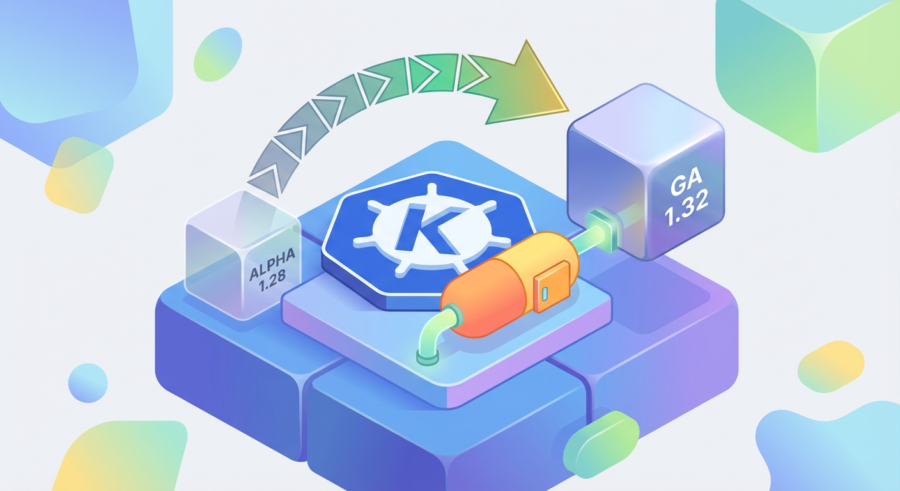
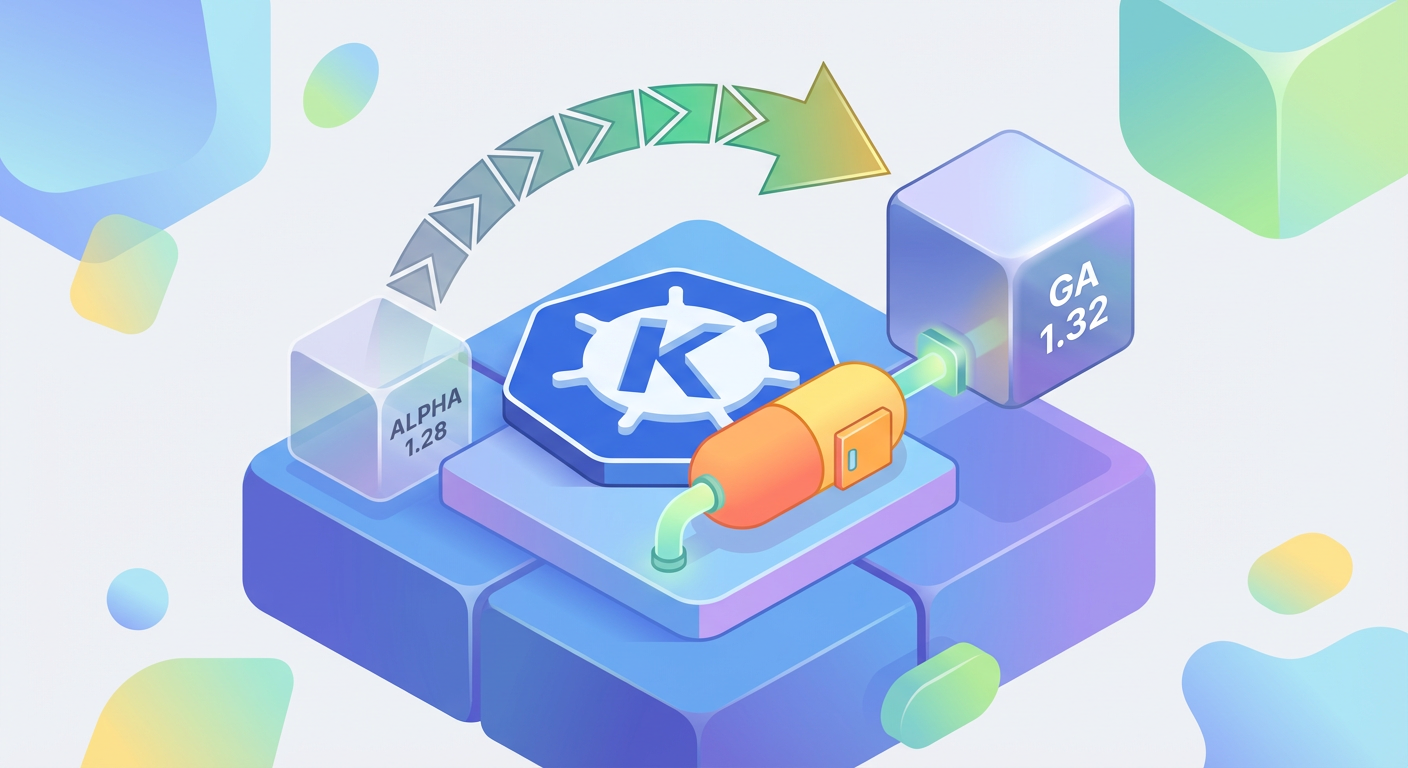
Kubernetes 1.32, released in December 2024, moves native sidecar container support to General Availability. This isn’t a minor feature bump. The platform is finally acknowledging what we’ve been doing in production for half a decade and giving us a proper mechanism to do it right. The feature first landed as alpha in version 1.28 back in August 2023, which means the Kubernetes team has had over a year to stress-test this in real environments. That matters.

What Actually Changed Under the Hood

The technical shift is straightforward but meaningful. Instead of treating sidecars as regular containers that happen to run alongside your main workload, Kubernetes now has a dedicated field with explicit lifecycle semantics. You declare a sidecar using an initContainers field with a restartPolicy set to Always. That sounds like a small thing. It isn’t.

What this means in practice: your sidecar starts before your main container. It stays running while your main container does its work. When your main container exits, the sidecar gets a grace period to clean up and then terminates. No more race conditions where your mesh proxy shuts down mid-request. No more logging sidecars missing the final moments of your application’s lifecycle. The kubelet now understands the intended behavior and enforces it.

This is the kind of thing that sounds obvious in retrospect. Of course the platform should understand that some containers in a pod have a different lifecycle than others. Of course it should coordinate their startup and shutdown. But getting there required the Kubernetes project to fundamentally reconsider how they model pod lifecycle, and that takes time.

Real Impact: Performance and Reliability Numbers

The Istio team published data earlier this year showing that native sidecar support cuts pod startup latency by up to 50 percent in high-churn environments compared to the legacy injection model. That’s not theoretical. That’s measured in production clusters handling real traffic. When you’re running thousands of pods and they’re turning over regularly, a 50 percent reduction in startup time translates to real resource savings and faster scaling behavior.

The performance gains are almost secondary to what happened with reliability, though. Linkerd’s maintainers ran benchmarks in early 2025 and found that Kubernetes-native sidecar lifecycle management eliminated an entire class of race-condition bugs that had caused roughly 8 percent of their reported production issues throughout 2024. Eight percent. That’s not noise. That’s the kind of problem that kept on-call engineers up at night because it was intermittent and hard to reproduce.

These aren’t marginal improvements for edge cases. This is foundational infrastructure getting fixed. The service mesh ecosystem depends on reliable sidecar injection and lifecycle management. When that works smoothly, everything downstream gets more stable.

Why This Matters for Service Mesh and Beyond

Service mesh adoption continues to climb. The CNCF Annual Survey 2025 shows that 52 percent of respondents are now running a service mesh in production, up from 42 percent just two years ago. That’s a massive shift. And service meshes live and die by their sidecar injection model. If injecting a proxy into every pod is fragile or slow, the entire value proposition gets compromised.

Native sidecar support doesn’t just benefit Istio and Linkerd. It raises the floor for any system that needs to colocate helper processes with application workloads. Observability agents, security policy enforcement, custom runtime hooks. All of these patterns become more reliable when the platform understands them natively.

The broader point: this is what happens when a platform matures. Early Kubernetes had to be flexible and minimal. Over time, you accumulate patterns that prove themselves in production, and then you bake them into the platform itself. Native sidecars represent that evolution.

The Adoption Curve and What to Expect

GA status doesn’t mean instant adoption. You’ll see enterprises cautiously updating their service mesh configurations throughout 2025. Some will wait for patch releases to stabilize the feature further. Others will run native sidecars alongside their existing injection models for months while they validate the behavior matches their expectations. That’s fine. That’s how production infrastructure moves.

The Kubernetes 1.32 Release Notes confirm the feature is stable enough for production use, but stable and immediately adopted are different things. Expect to see ecosystem tooling catch up gradually. Mesh operators and Helm charts will update their defaults. Operators already running 1.32 will test the feature in staging environments first.

This is also a moment to audit your own infrastructure. If you’re running a service mesh or any sidecar-based workload, 1.32 is a reasonable point to start planning a migration. Run some tests in a non-critical cluster. Measure the behavior. Compare it to what you’re running now. The data will tell you whether the investment in upgrading is worth it for your specific environment.

The Skeptic’s Final Assessment

I’ve been skeptical of many Kubernetes features that seemed overengineered or premature. This one earned my respect. The Kubernetes team took something we were all doing badly and turned it into something we can do reliably. That’s the core job of an orchestration platform, and they got it right.

Native sidecars won’t solve every problem you have with Kubernetes. They won’t make your poorly-designed services any better. But they will remove a category of bugs and performance issues that have accumulated over years of workarounds. In infrastructure work, that’s worth a lot.

Have you started testing native sidecars in your environment? What’s your migration timeline looking like? The conversation around how teams actually adopt this feature is still developing, and real-world experience matters more than any benchmark or release note.

Extended Thinking Mode Changed Everything: Six Months With Claude 3.7 Sonnet in Production

The Moment It Clicked

February 2025 doesn’t feel that long ago, but it does feel like a different era for how we write code. When Anthropic rolled out Claude 3.7 Sonnet with extended thinking mode, I was skeptical. Another incremental release. Another promise of better reasoning that would probably just mean slightly better outputs at slightly higher latency.

I was wrong. Not catastrophically so, but wrong enough that I’ve spent the last six months quietly rewriting how my team approaches code review, architecture decisions, and debugging workflows. The difference isn’t marginal. It’s architectural.

The core innovation is deceptively simple: the model can now spend variable compute time reasoning before responding, up to 128,000 thinking tokens. That’s roughly the equivalent of letting an engineer think through an entire codebase before committing to an answer. You can’t see the thinking in your API response. It happens in the background. But you feel it.

The Numbers Don’t Lie, But They Don’t Tell the Whole Story Either

On SWE-bench Verified leaderboard, Claude 3.7 Sonnet scored 70.3% on real-world software engineering tasks. GPT-4o sits at 38.8% on the same benchmark. That’s not a small gap. That’s the difference between a tool that occasionally helps and one that consistently solves problems.

But benchmarks measure one thing: how well a model performs on predetermined tests. They don’t measure what happens when you’re at 2 AM staring at a race condition in a distributed system, or when you’re trying to refactor a legacy codebase where the original authors left three years ago and the documentation is a fairy tale.

What I’ve seen in production is different. Extended thinking mode means the model spends real time considering edge cases, potential failure modes, and architectural implications. It asks itself questions. It second-guesses its own answers. Then it commits to a response that’s usually thoughtful enough to save you an hour of painful debugging.

Adoption Is Real, But Trust Remains the Actual Bottleneck

GitHub Copilot crossed 1.8 million paid subscribers in early 2025, and when Microsoft integrated Claude 3.7 as a selectable model in agent mode, adoption accelerated. AWS’s Amazon Q Developer reported that enterprise customers using agent mode completed code transformation tasks 80% faster than manual refactoring. Speed is becoming the commodity.

The Stack Overflow survey from 2025 is the more interesting story. Seventy-six percent of developers are now using or planning to use AI coding tools. That’s a 14-point jump from 62% the year before. The shift is real. But here’s the detail nobody dwells on long enough: 58% still list trust in AI-generated code for production as their top concern.

That’s the friction point nobody talks about enough. It’s not capability anymore. It’s confidence. Teams have moved past “Can the AI write code?” to “Can I trust the AI’s code in my production system?” Those are fundamentally different questions. The first is technical. The second is organizational and cultural.

How Extended Thinking Actually Changes Your Workflow

Here’s what six months has shown me about real usage patterns. When you enable extended thinking mode for specific tasks, you’re not paying a massive latency penalty for earth-shattering improvements. You’re paying a moderate latency cost for consistently better reasoning about complexity.

Our team started using it for three categories of work. First: architectural reviews. Instead of writing a PR comment and waiting for debate, we throw Claude 3.7 at the proposed architecture with extended thinking enabled. It explores trade-offs, questions assumptions, and flags issues that miss the initial conversation. Sometimes it catches something real. Often it just validates what we were already thinking, which has its own value.

Second: refactoring large modules. Extended thinking mode lets the model hold the entire context of a system in focus while considering implications. It’s not perfect. It still misses things. But it reduces the cognitive load of refactoring from exhausting to manageable.

Third: debugging unfamiliar codebases. When someone on the team needs to understand a system they didn’t write, extended thinking mode combined with codebase context yields something surprisingly close to having the original author explain the design decisions.

What doesn’t work? Real-time code completion. Extended thinking adds latency. For quick inline suggestions, you still want a faster model. The interesting architectural problem is figuring out when to invoke extended thinking and when to reach for speed.

The Trust Question Hasn’t Changed, But the Conversation Has

I’ve watched teams move from “We won’t use AI code” to “We’ll use AI code but verify everything” to “We’ll use AI code and spot-check the risky parts.” That’s progress, but it’s not solved. It’s managed.

The honest take after six months: extended thinking mode creates better code suggestions. That’s measurable. Whether those suggestions are trustworthy in your specific production context is something only you can determine by reading the code, understanding your system’s failure modes, and making a judgment call.

Some teams have built integration testing frameworks around AI-generated code. Others treat it as a draft that requires architectural review before merge. A few have established policies about which services can include AI-assisted code and which cannot. None of these approaches is universally correct.

What matters is that extended thinking mode makes the conversation more sophisticated. You’re not debating capability anymore. You’re debating trust and risk tolerance and organizational policy. That’s the conversation we should be having.

What’s Actually Changed

Six months in, the biggest shift is this: AI code assistance moved from “neat tool” to “architectural consideration.” When you’re designing systems now, you have to think about how your code will appear to an AI model. Will it be clear enough for extended thinking to parse? Will the context window contain enough information? These are legitimate design questions.

The benchmark numbers matter. The subscription adoption matters. But what matters most is whether your team has figured out how to fold this capability into your actual workflow without either blindly trusting it or refusing to use it at all.

If you’re still evaluating whether extended thinking mode is worth the latency trade-off, run it against one of your current pain points. Don’t compare it to your favorite model. Compare it to your current process. That’s the relevant baseline.

What’s your experience been? Have you integrated extended thinking into your workflow, or does it still feel like an experiment? Drop a note if you’re willing to share what’s worked and what hasn’t.

The Vibe Coding Backlash Is Here and It’s Mostly Justified — A Senior Engineer’s Honest Assessment

What Vibe Coding Actually Is

Last February, Andrej Karpathy described a pattern he was seeing in the wild. Developers were treating AI code generation like a conversation rather than a deliberate engineering process. You ask the tool to write something. It generates output. You accept it without really reading it. Maybe you test it once. Then you ship it. Karpathy called this “vibe coding,” and the term stuck because it captures something real about how people use these tools today.

The Vibe Coding Backlash Is Here and It's Mostly Justified — A Senior Engineer's Honest Assessment
The Vibe Coding Backlash Is Here and It’s Mostly Justified — A Senior Engineer’s Honest Assessment

This isn’t theoretical. By mid-2025, Cursor, an AI-first IDE built on VS Code, hit 500,000 active developers. That’s not a niche anymore. Cursor raised a $900 million Series B at a $9 billion valuation. The infrastructure exists now. The workflow is optimized for this. You can generate entire features without leaving your editor. The tools are fast, polished, and frictionless enough that treating code generation like casual conversation feels completely natural.

The problem is that natural doesn’t mean safe. And that’s where the backlash becomes justified.

The Data Tells a Specific Story

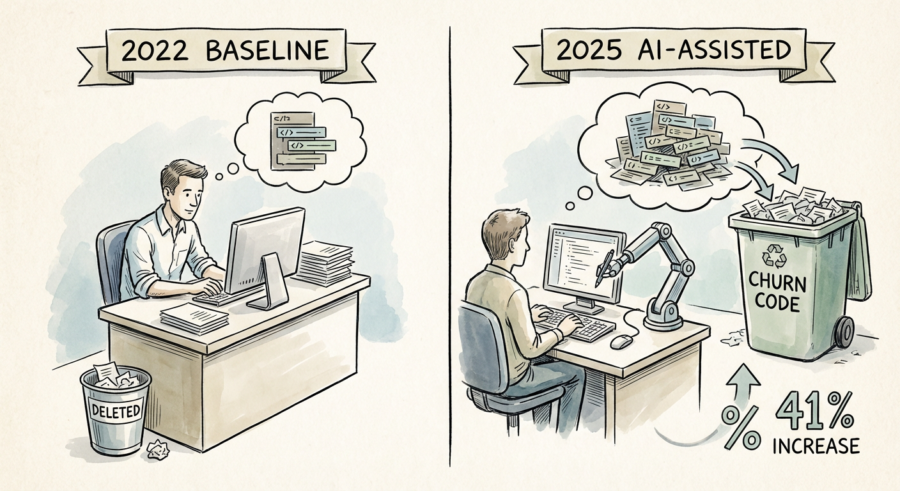
I don’t trust opinions much anymore. I want data. So let’s look at what researchers actually found. GitClear analyzed 153 million lines of code in 2025 and compared AI-assisted codebases to baselines from 2022. The finding was stark: AI-assisted code showed a 41% increase in churn, code that gets written and then deleted or reverted within two weeks. That’s not a small margin of error. That’s a pattern.

Churn code matters because it signals waste. Waste of engineering time, review cycles, CI/CD resources. More importantly, it suggests that code is being generated without sufficient forethought. A developer who spends five minutes thinking before writing code produces less churn than a developer who prompts an AI to generate five different approaches and then picks one based on gut feeling. The GitClear 2025 AI code quality research shows this empirically.

But churn is just one metric. Security is another. And it’s worse.

Security Is Where Vibe Coding Breaks Down

The U.S. government doesn’t usually jump into technology debates. But CISA did with their 2025 Secure by Design report. They specifically called out LLM-generated code as a growing attack surface. This isn’t hand-wringing. It’s measured language from a cybersecurity agency saying AI tools are reproducing known vulnerable patterns at measurable rates. SQL injection. Cross-site scripting. The classics. The patterns that should be extinct by now.

Here’s where vibe coding becomes dangerous. A developer who reads every line of generated code would catch these patterns because they’ve seen them before. A developer who accepts generated code without reading it won’t catch them until they’re in production. And sometimes not even then. CISA Secure by Design initiative documents this explicitly. The vulnerabilities are real. The reproduction rates are measurable.

The Netlify 2025 State of Web Development report found that 67% of frontend developers used AI to generate entire components. Two out of three developers. But only 23% of those developers reported consistently reviewing generated code for security before deployment. Do the math. That’s roughly 50% of frontend developers shipping AI-generated code with minimal security review. That’s not a backlash waiting to happen. That’s a vulnerability cascade that’s already happening.

Why the Backlash Is Justified

Let me be direct. The backlash isn’t about AI being bad. It’s about workflow culture being misaligned with risk. When tools are frictionless enough, people stop treating code like code. They treat it like suggestions from a smart friend. Suggestions feel disposable. Code isn’t disposable.

I’ve built systems that run for years. I’ve also built systems that collapsed because someone took a shortcut. The shortcut never felt like a shortcut at the time. It felt pragmatic. It felt like moving fast. Then something broke and suddenly that saved time became lost time, multiplied by the cost of firefighting and reputation damage.

Vibe coding accelerates the broken-ness timeline. Not always. Not catastrophically in every case. But statistically, measurably, the data shows increased churn, increased vulnerability reproduction, and decreased security review. That’s not a risk worth taking casually.

What Actually Works

The answer isn’t to reject AI tools. Cursor, Copilot, and similar platforms are genuinely useful when used deliberately. The answer is to restore intentionality to the process. That means reading what gets generated. It means understanding why a particular approach was chosen. It means thinking before you prompt and thinking after you receive output.

For frontend developers and full-stack engineers, that means code review becomes non-negotiable. For security-critical paths, that means running generated code through threat modeling before deployment. For teams, that means talking about what vibe coding looks like in your context and establishing guardrails that actually reflect your risk profile.

Senior engineers have one job in this moment. We need to mentor the people coming behind us toward wisdom instead of speed. That’s not gatekeeping. That’s the responsibility that comes with experience. The backlash is justified. But so is the opportunity to build something better.

What’s your experience been? Have you seen vibe coding patterns in your codebase? I’d genuinely like to hear where the data matches your day-to-day reality and where it diverges.

Page 7 of 12

Powered by WordPress & Theme by Anders Norén